M-1 MacでローカルLLM
M-1 Macを使っている人はまだ多いと思います。2020年頃のモデルですが、仕事ならともかく、プライベートで使う分にはまだまだ現役です。
しかし、ローカルLLMを動かそう!となると、話は別です。
ローカルでAIに簡単なタスクをしてもらいたいと思い、LM Studioを入れました。
現時点ではgoogle/gemma-4が人気のようなので、何も考えずにそのモデルをダウンロードして、動かしてみました。
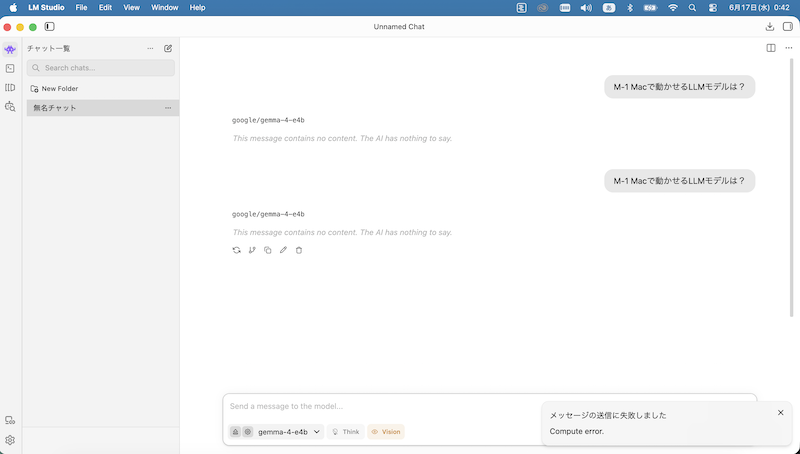
すると、下の方に「メッセージの送信に失敗しました。Compute error」と出ました。
LMのログを確認する
左下の歯車アイコン>General>App Infoの中に、「Open app logs」というのがあり、開きます。
[2026-06-16 22:55:49.709] [info]  App starting...
[2026-06-16 22:55:49.711] [info]  [AppUpdater] Feed base: https://updates.lmstudio.ai, channel: stable
[2026-06-16 22:55:49.712] [info]  [AppUpdater] Checking for updates... (current state: idle)
[2026-06-16 22:55:49.712] [info]  AppUpdater state changed to checking-for-updates-periodic
[2026-06-16 22:55:49.712] [info]  [AppUpdater] Fetching version info from https://versions-prod.lmstudio.ai/update/darwin/arm64/0.4.16
[2026-06-16 22:55:50.406] [info]  [AppUpdater] Received version info response
[2026-06-16 22:55:50.406] [info]  [AppUpdater] Current version: 0.4.16 (build: 2), new version: 0.4.16 (build: 2)
[2026-06-16 22:55:50.406] [info]  No update available: 0.4.16 (build: 2) <= 0.4.16 (build: 2)
[2026-06-16 22:55:50.407] [info]  AppUpdater state changed to idle
[2026-06-16 22:57:41.691] [error] [LMSInternal][LMSAuthenticator][Client=LM Studio][Endpoint=artifactDownloadResolutionSelectedDownloadOptionIndex] Error in writable signal handler: Error: Artifact download resolution task not found: 6WqlXsHy+3Kzyf94MQ8vfmbO
    at _0x2aea73.getArtifactDownloadResolutionSelectedDownloadOptionIndexWritableSignal (/Applications/LM Studio.app/Contents/Resources/app/.webpack/main/index.js:809:8096)
    at _0x53fc40.<computed>.getArtifactDownloadResolutionSelectedDownloadOptionIndexWritableSignal (/Applications/LM Studio.app/Contents/Resources/app/.webpack/main/index.js:355:20452)
    at Object.handler (/Applications/LM Studio.app/Contents/Resources/app/.webpack/main/index.js:629:90965)
    at /Applications/LM Studio.app/Contents/Resources/app/.webpack/main/index.js:1556:221
[2026-06-16 23:00:32.027] [error] Uncaught Exception: Error: ENOSPC: no space left on device, write
[2026-06-16 23:00:32.036] [error] Uncaught Exception: Error: ENOSPC: no space left on device, write
[2026-06-16 23:00:32.320] [error] [DownloadsManager] Failed to persist downloads Error: ENOSPC: no space left on device, open '/Users/xxx/.lmstudio/.internal/single-downloads-info.json'
    at async open (node:internal/fs/promises:641:25)
    at async writeFile (node:internal/fs/promises:1215:14)
    at async _0x3f7540.<computed>.writeFileDataOneStage (/Applications/LM Studio.app/Contents/Resources/app/.webpack/main/index.js:363:25901)
    at async _0x3f7540.<computed>.writeFile (/Applications/LM Studio.app/Contents/Resources/app/.webpack/main/index.js:363:26506)
    at async /Applications/LM Studio.app/Contents/Resources/app/.webpack/main/index.js:363:27386
Error: ENOSPC: no space left on device,
とありますが、SSDが不足している。ということらしいです。
このMacを見てみると、メモリは8GBのようです。
M-1 MacはGPUは積んでいますが、VRAMは積んでいません。しかし、ユニファイドメモリと言って、メモリ8GBのうちMacが使っていない部分がVRAMの役割を果たすようです。
構造的にはLLMに向いているようです。
google/gemma-4 をロードするだけで、Macが重くなってしまい、ブログ記事を書くのがやっとなぐらいもっさりしてしまいます。
しかし、ロードを解除するだけで軽くなるので一安心。
結論、M-1 Macでgoogle/gemma-4を動かすのは諦めた方が良さそうです。
M-1 macでも動かせるモデルは?
調べたところ、M-1 macでも動かせる軽量なモデルがあることがわかりました。
LFM2.5 というものです。
具体的にはLFM2.5-1.2B-JPという日本語処理に強いモデルです。
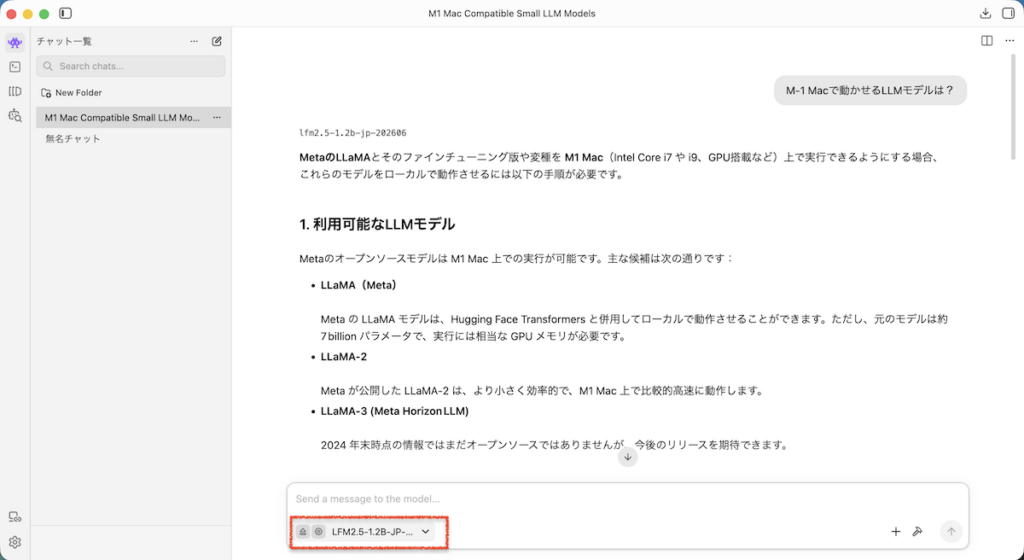
実際に動かしてみると、Claudeのように文字が生成されていくので感動します。
しかし、流石に生成AIとしてのレベルが低すぎました。
登場したばかりの頃のChatGPTを思い出しました。
それらしい日本語を生成しているにすぎないと感じさせるレベルのものです。
タスクをしているという感覚にはなりませんでした。
動かせるモデルの探し方
モデル検索画面で、動かせるかどうかわかります。
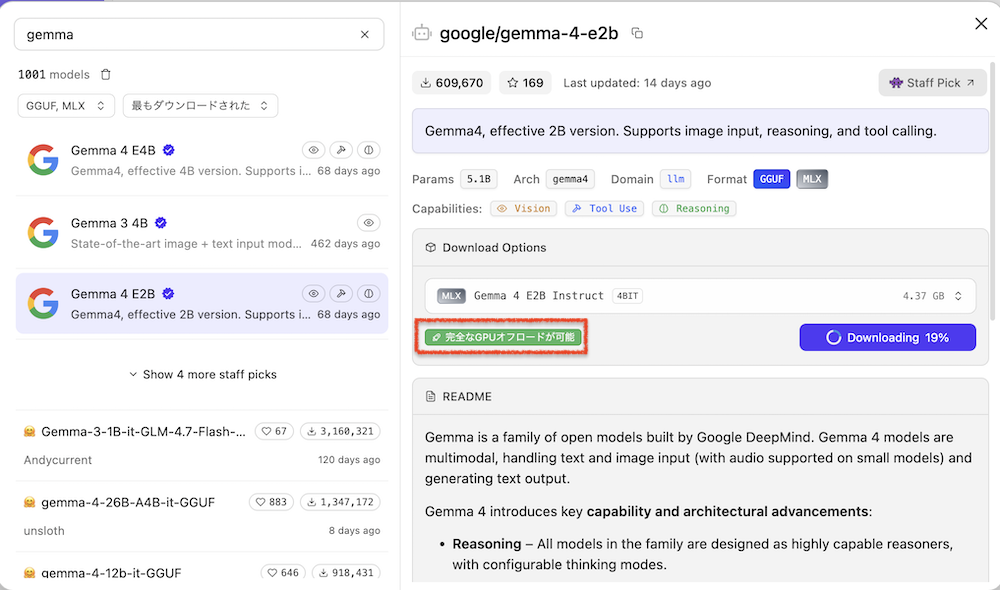
このように「完全なGPUオフロードが可能」と表示されていればOKです。
GPU内でデータが完結するため、常に高速に処理がなされます。
「部分オフロード」と表示されていても、動きはしますがもっさりとした出力になります。
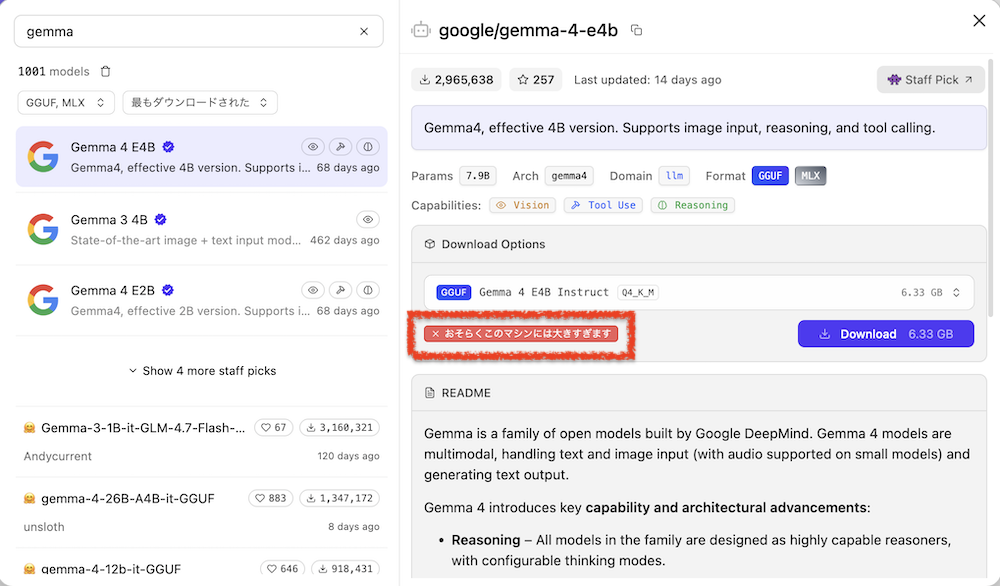
このように出ていたら、動かないです。
マシンが重くなるか、冒頭のようにCompute Errorと表示されます。
この方法で、いろんなモデルを試してみてください。
M-1 Mac 8GBメモリでも、google/gemma-4-e2bを動かすことができました。計算中はもっさりしますが。
遅かれ早かれ、今のClaudeやGeminiレベルのことも低スペックマシンのローカルLLMでできるようになりそうですね。